> ## Documentation Index
> Fetch the complete documentation index at: https://support.lilt.com/llms.txt
> Use this file to discover all available pages before exploring further.
# Enable/Disable Features
## Feature List
LILT has numerous features that can be enabled by executing the steps below. The available features are listed below:
| **Feature** | **Type** | **Description** |
| -------------------------------------- | ------------------------------------------------------ | ------------------------------------------------------------------------------------------------------------------------------------------------------------------------------------------------------------------------------------------------------------------------------------------------------------------ |
| enableQuickTranslate | [Admin CLI](/kb/enable-features#featurecli) | Quick Translate allows for easy batch translation of multiple documents (of the same source language) at the same time using LILT's Neural Machine Translation (MT). This tool is convenient for when you want to quickly translate content without having to commit to using a dedicated translator and reviewer. |
| enableFilteredTMX | [Admin CLI](/kb/enable-features#) | For organizations with this flag enabled, "Exporting memory as TMX" will give the option to filter results based on any custom fields added to the entries. |
| enableConnectorsView | [Admin CLI](/kb/enable-features#) | With this flag disabled (false), LILT's navigation will NOT include the `Connectors` tab. This product area is typically not relevant to on-premises organizations, thus removing it can create a cleaner interface for users. |
| enableNewLinguistPage | [Admin CLI](/kb/enable-features#) | See [Linguist Homepage](/kb/enable-features#linguisthomepage) below |
| enableLiltCreate | Both | See [LILT Create](/kb/enable-features#create) below **Note**: Whisper functionality is included in this. |
| Incompatible Browsers | [Environment Variable](/kb/enable-features#featureenv) | See [Incompatible Browsers](/kb/enable-features#incompatiblebrowsers) below |
| enableOCR | [Admin CLI](/kb/enable-features#) | Enable OCR using internal Tesseract deployment |
| enableOpenAiWhisper | [Admin CLI](/kb/enable-features#) | Enable ACR using internal Whisper deployment |
| EnableCustomerReviewerDomainAssignment | | Allow assigning domains as customer reviewer on projects |
| EnableAllowPreProcessing | | Enable pre processing universal file upload |
| AdditionalGuidelines | | Prompt response job additional guidelines. Applies to jobs and projects. |
| EnableDataLabeling | | Data Labelling Feature (internal reference) |
| EnableSubfiltersSegmentation | | To enable SRX |
| enableDomains | | Enable domains creation and list for your org |
| enableAIReview | [Admin CLI](/kb/enable-features#) | Will enable the [AI Review](/kb/ai-review) functionality and workflows for your org.
*Note: You must also have LLaMa enabled and a **minimum of 4 Nvidia T4 GPUs** in order to support AI Review.* |
| humanAIOptimizedWorkflow | [Admin CLI](/kb/enable-features#) | Flag enables an "Optimize with AI" feature that auto-accepts segments where AI Review identified no errors |
| enableCustomQAConfig | [Admin CLI](/kb/enable-features#) | Enable Custom QA Configuration |
| enableVerifySegments | [Admin CLI](/kb/enable-features#) | Enable Verify Segments Workflow for Analysts |
| enableWSO2Login | [Admin CLI](/kb/enable-features#featurecli) | Required when using WSO2 or Embedded OIDC for authentication. Enables the authentication type selector in the user invite UI and allows the EMBEDDED\_OIDC auth type to be assigned to new users. See [WSO2 SSO configuration](/kb/single-sign-on-sso#wso2). |
| External Model Configuration | [Environment Variable](/kb/enable-features#featureenv) | See [External Model Configuration](/kb/enable-features#external-model-configuration) below |
## Enable Features via Admin CLI
NOTE: For LILT November 2023 release onwards, please use `npm run dist-admin-cli` instead of `admin-cli`
Perform the following steps to enable features for the organization:
1. Connect to front pod:\
`master# kubectl exec -it -n lilt -c front -- /bin/bash`
2. To enable the feature for an organization, run this command from a front pod, replacing `[enableFeature]` with the appropriate feature and `` with the relevant Organization ID:\*\*
```bash theme={null}
npm run dist-admin-cli -- set-org-setting --orgIds --settingName=[enableFeature] --value=true
```
3. Refresh the UI.
4. Repeat this for all the organizations.
### Linguist Homepage
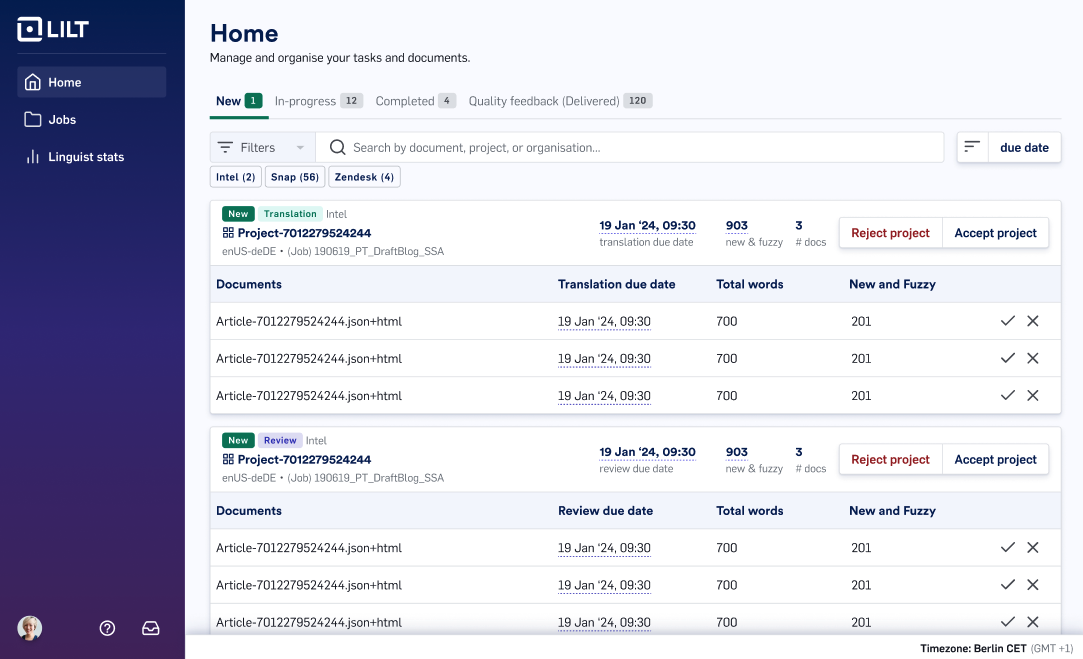
The Linguist Homepage is enabled for the default Translator and Reviewer roles. For custom roles, you will need to select what the user’s homepage should be. For more information, please refer to documentation for the [Linguist Homepage](/kb/lilt-linguist-homepage).
 #### Configuration instructions
In order to configure the Linguist Homepage, please run the following command for each org:
`npm run dist-admin-cli -- set-org-setting -o=1 -s=enableNewLinguistPage -v=true`
Please note: New customers as of Q2 2024 have this enabled by default. If you’re a customer who has been working with LILT since before Q2 2024, you will need to enable this if you’d like the Linguist Homepage.
## Enable workflow
Workflows are enabled by default. However, if you don’t see them due to migration issues, connect to the front pods and run the following commands.
```bash theme={null}
npm run dist-admin-cli -- create-workflows-data -o=
```
## Enabling Features via Environment Variables
### Incompatible Browsers
Add a new environment variable to the front values.yaml file as such `ALLOW_INCOMPATIBLE_BROWSERS: true` . This should be the same place customers configure their header and footer text.
## LILT Create
### In the UI
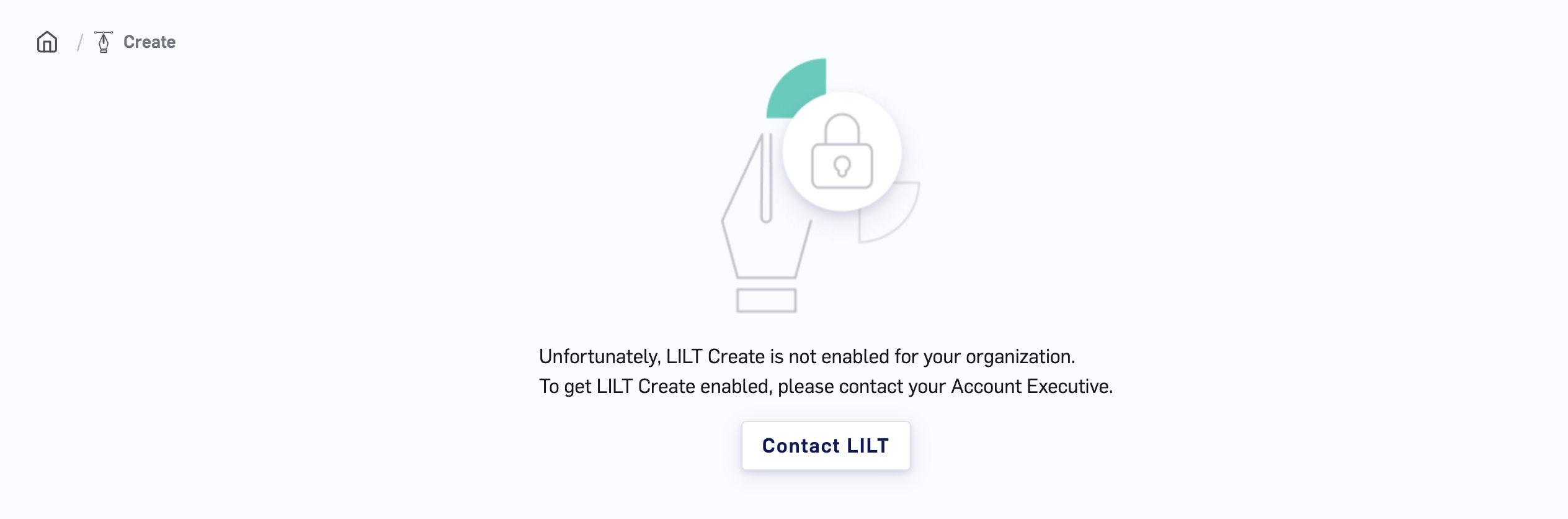
LILT Create is enabled by default. In environments where this has the possibility to cause confusion to users, system administrators can configure LILT Create per organization. If disabled, users navigating to the LILT Create page will instead see a brief statement that LILT Create has not been enabled for their organization.
#### Configuration instructions
In order to configure the Linguist Homepage, please run the following command for each org:
`npm run dist-admin-cli -- set-org-setting -o=1 -s=enableNewLinguistPage -v=true`
Please note: New customers as of Q2 2024 have this enabled by default. If you’re a customer who has been working with LILT since before Q2 2024, you will need to enable this if you’d like the Linguist Homepage.
## Enable workflow
Workflows are enabled by default. However, if you don’t see them due to migration issues, connect to the front pods and run the following commands.
```bash theme={null}
npm run dist-admin-cli -- create-workflows-data -o=
```
## Enabling Features via Environment Variables
### Incompatible Browsers
Add a new environment variable to the front values.yaml file as such `ALLOW_INCOMPATIBLE_BROWSERS: true` . This should be the same place customers configure their header and footer text.
## LILT Create
### In the UI
LILT Create is enabled by default. In environments where this has the possibility to cause confusion to users, system administrators can configure LILT Create per organization. If disabled, users navigating to the LILT Create page will instead see a brief statement that LILT Create has not been enabled for their organization.
 #### Configuration instructions
In order to disable the LILT Create page, please run the following command for each org:
`npm run dist-admin-cli -- set-org-setting -o=1 -s=enableLiltCreate -v=false`
### System Configuration
Please follow the instructions in the section [Enable LLM Services](#enable-llm-services).
## Miscellaneous Configurations
### LILT QA Checks
LILT QA Checks are enabled by default. To disable this functionality, set the following value in your `lilt/environments/lilt/values.yml` file:
```bash theme={null}
qa:
onpremValues:
app:
args:
option4: --disable-lilt-qa-checks
```
## LLM Services
With the LILT v5.3.0 release (November 2025), customers can now opt to enable a set of additional LLM services. Follow the steps below to configure the following features:
| **Feature** | **Service/ Model** |
| ---------------------------------- | ------------------ |
| LILT Create | Llama3 (GPU Only) |
| OCR | Gemma (GPU Only) |
| ASR (Automatic Speech Recognition) | Whisper (GPU/ CPU) |
### Prerequisite
Each of these services requires dedicated GPU resources. Please refer to the [Self-Managed Hardware Requirements](/kb/self-managed-hardware-requirements) for the specific resource needs.
### Enable
1. GPU Availability: LLM services should not be enabled on systems with only 4 GPUs, as this may cause instability in standard neural services (translation, update, VMF) due to limited resources.
2. Update `values.yaml` and enable the following services for the required feature:
a. `llama-vllm-inference`: Llama3 model for LILT Create
b. `gemma-vllm-inference`: Gemma model for OCR
c. `llm-inference-whisper`: Whisper model for ASR
##### Using CPU Workers for ASR (Whisper Model)
To run ASR (Whisper) on CPU workers instead of GPU, follow the guidance in your custom `values.yaml` and deploy. For example:
```bash theme={null}
# Uncomment the following lines if using CPU workers
# includeTensorflowThreadSettings: false
# bucket: lilt
# resources:
# requests:
# cpu: 1
# memory: 8G
# limits:
# memory: 8G
# Remove the following nodeSelector if using CPU workers
nodeSelector:
capability: llm-gpu
node-type: whisper
# Uncomment the following lines if using CPU workers
# nodeSelector:
# node-type: worker
```
## External Model Configuration
Self-managed deployments can optionally allow organization administrators to control which external AI providers (e.g., Amazon Translate, Google Translate, DeepL, Azure, OpenAI, Anthropic, AWS Bedrock) are available on the AI Providers page.
When enabled, a new **External Models** tab appears under **Organization Settings** where administrators can toggle individual providers on or off.
### Enable
Set `ENABLE_EXTERNAL_MODEL_CONFIG` to `true` in your `values.yaml` and deploy. The **External Models** tab will then appear under **Organization Settings** for all organizations.
### Configure Providers
Administrators can enable providers in two ways:
**Via the UI:**
1. Navigate to **Organization Settings** > **External Models**
2. Toggle on the desired providers
3. Enabled providers will immediately appear on the **AI Providers** page
**Via the Admin CLI:**
```bash theme={null}
npm run dist-admin-cli -- set-org-setting --orgIds \
--settingName=enabledAIProviders \
--value='{"aws":true,"google":true,"deepl":true}'
```
The setting accepts a JSON object where keys are provider identifiers and values are booleans. Available provider keys:
| **Key** | **Provider** |
| ------------ | ---------------- |
| aws | Amazon Translate |
| google | Google Translate |
| deepl | DeepL |
| azure\_gpt | Azure |
| open\_ai | OpenAI |
| anthropic | Anthropic |
| aws\_bedrock | AWS Bedrock |
Providers that are already configured (i.e., credentials have been saved) will always appear on the AI Providers page regardless of the toggle state. The toggle only controls visibility of unconfigured providers.
#### Configuration instructions
In order to disable the LILT Create page, please run the following command for each org:
`npm run dist-admin-cli -- set-org-setting -o=1 -s=enableLiltCreate -v=false`
### System Configuration
Please follow the instructions in the section [Enable LLM Services](#enable-llm-services).
## Miscellaneous Configurations
### LILT QA Checks
LILT QA Checks are enabled by default. To disable this functionality, set the following value in your `lilt/environments/lilt/values.yml` file:
```bash theme={null}
qa:
onpremValues:
app:
args:
option4: --disable-lilt-qa-checks
```
## LLM Services
With the LILT v5.3.0 release (November 2025), customers can now opt to enable a set of additional LLM services. Follow the steps below to configure the following features:
| **Feature** | **Service/ Model** |
| ---------------------------------- | ------------------ |
| LILT Create | Llama3 (GPU Only) |
| OCR | Gemma (GPU Only) |
| ASR (Automatic Speech Recognition) | Whisper (GPU/ CPU) |
### Prerequisite
Each of these services requires dedicated GPU resources. Please refer to the [Self-Managed Hardware Requirements](/kb/self-managed-hardware-requirements) for the specific resource needs.
### Enable
1. GPU Availability: LLM services should not be enabled on systems with only 4 GPUs, as this may cause instability in standard neural services (translation, update, VMF) due to limited resources.
2. Update `values.yaml` and enable the following services for the required feature:
a. `llama-vllm-inference`: Llama3 model for LILT Create
b. `gemma-vllm-inference`: Gemma model for OCR
c. `llm-inference-whisper`: Whisper model for ASR
##### Using CPU Workers for ASR (Whisper Model)
To run ASR (Whisper) on CPU workers instead of GPU, follow the guidance in your custom `values.yaml` and deploy. For example:
```bash theme={null}
# Uncomment the following lines if using CPU workers
# includeTensorflowThreadSettings: false
# bucket: lilt
# resources:
# requests:
# cpu: 1
# memory: 8G
# limits:
# memory: 8G
# Remove the following nodeSelector if using CPU workers
nodeSelector:
capability: llm-gpu
node-type: whisper
# Uncomment the following lines if using CPU workers
# nodeSelector:
# node-type: worker
```
## External Model Configuration
Self-managed deployments can optionally allow organization administrators to control which external AI providers (e.g., Amazon Translate, Google Translate, DeepL, Azure, OpenAI, Anthropic, AWS Bedrock) are available on the AI Providers page.
When enabled, a new **External Models** tab appears under **Organization Settings** where administrators can toggle individual providers on or off.
### Enable
Set `ENABLE_EXTERNAL_MODEL_CONFIG` to `true` in your `values.yaml` and deploy. The **External Models** tab will then appear under **Organization Settings** for all organizations.
### Configure Providers
Administrators can enable providers in two ways:
**Via the UI:**
1. Navigate to **Organization Settings** > **External Models**
2. Toggle on the desired providers
3. Enabled providers will immediately appear on the **AI Providers** page
**Via the Admin CLI:**
```bash theme={null}
npm run dist-admin-cli -- set-org-setting --orgIds \
--settingName=enabledAIProviders \
--value='{"aws":true,"google":true,"deepl":true}'
```
The setting accepts a JSON object where keys are provider identifiers and values are booleans. Available provider keys:
| **Key** | **Provider** |
| ------------ | ---------------- |
| aws | Amazon Translate |
| google | Google Translate |
| deepl | DeepL |
| azure\_gpt | Azure |
| open\_ai | OpenAI |
| anthropic | Anthropic |
| aws\_bedrock | AWS Bedrock |
Providers that are already configured (i.e., credentials have been saved) will always appear on the AI Providers page regardless of the toggle state. The toggle only controls visibility of unconfigured providers.