> ## Documentation Index
> Fetch the complete documentation index at: https://support.lilt.com/llms.txt
> Use this file to discover all available pages before exploring further.
# Custom Models
## Managing Models within LILT
Within the Model Hub you can create and update Models from LILT and third party translation providers.
### Setting up a Model
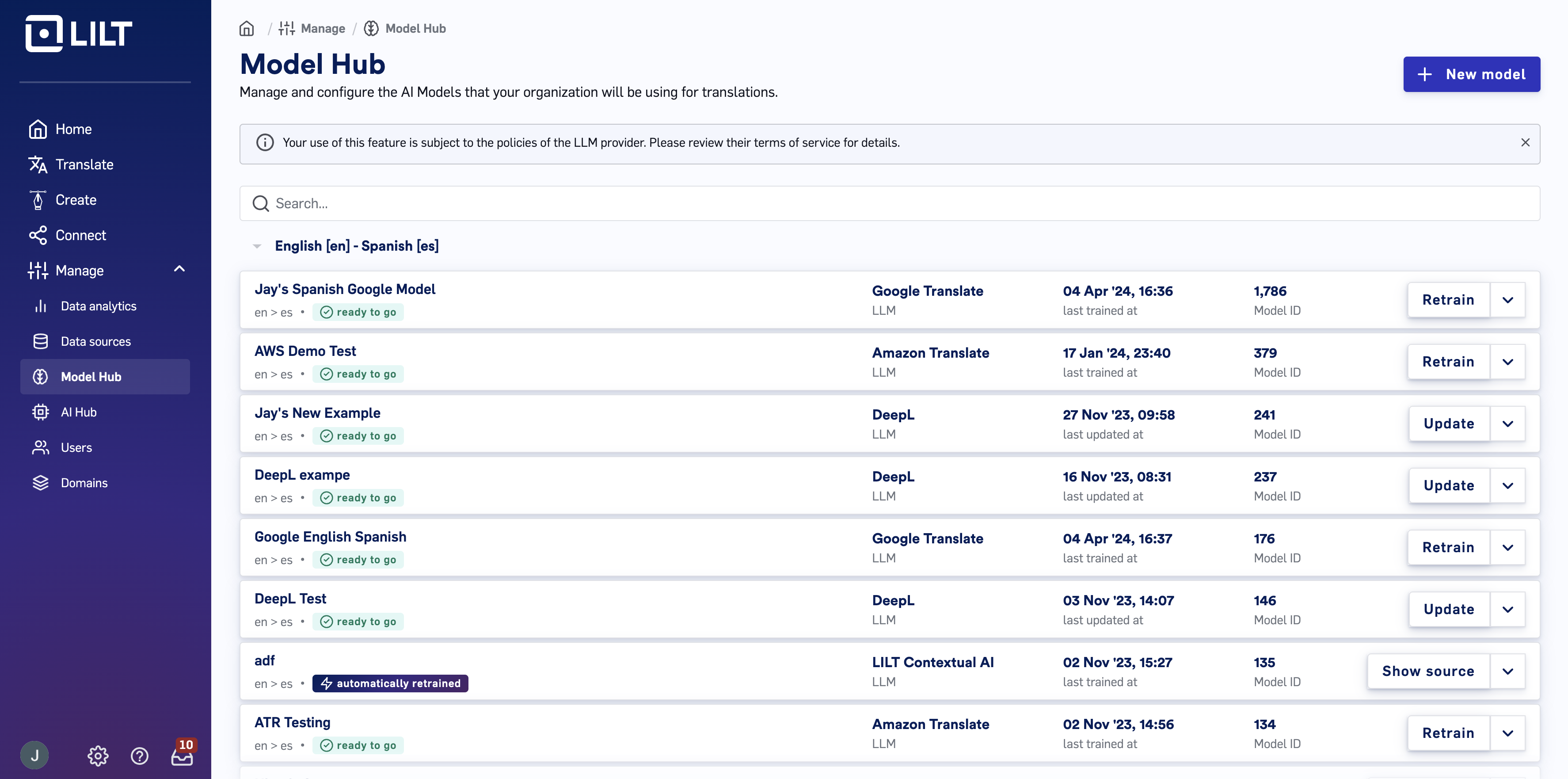 To get started, navigate to the `Manage` tab. Inside the `Model Hub` tab you'll see a list of models
To create a new model:
1. Using the sidebar navigate into “Manage” then select “Model Hub”.
2. Once on the Models page, select “+ New Model”.
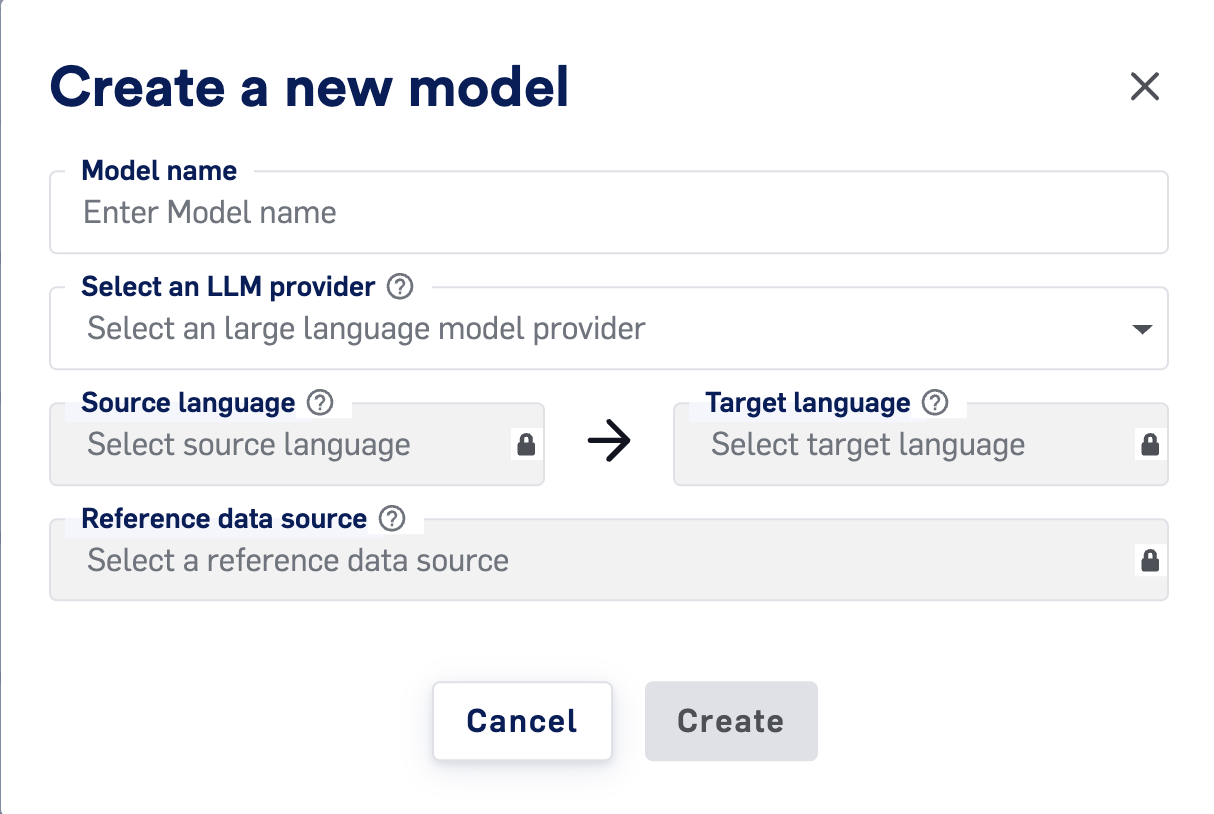
1. Create a name for your model, note this name will carry over onto the third party system as well.
2. Enter source and target languages
1. Note the third party model has to support this language pair.
3. Select a reference Data Source. Memory and Termbase entries from this Data Source will be sent to your 3rd-party LLM provider to fine-tune your Model.
4. Select from enabled [AI providers](/kb/3rd-party-llm-support-for-the-contextual-ai-engine).
5. Click `Create`.
To get started, navigate to the `Manage` tab. Inside the `Model Hub` tab you'll see a list of models
To create a new model:
1. Using the sidebar navigate into “Manage” then select “Model Hub”.
2. Once on the Models page, select “+ New Model”.
1. Create a name for your model, note this name will carry over onto the third party system as well.
2. Enter source and target languages
1. Note the third party model has to support this language pair.
3. Select a reference Data Source. Memory and Termbase entries from this Data Source will be sent to your 3rd-party LLM provider to fine-tune your Model.
4. Select from enabled [AI providers](/kb/3rd-party-llm-support-for-the-contextual-ai-engine).
5. Click `Create`.
 ### Retraining an existing Model
LILT stores your linguistic assets in Data Sources, and adds entries with each sentence translated during Verified Translation projects. If at any time, you want to use that data to retrain and customize your 3rd-party models, simply navigate to the models page and select “Retrain”. This action will prompt you with a confirmation modal showing the LLM and time since last training. If you wish to update the model with the new entries from your Data Source, confirm by clicking “Retrain”.
✔️ Please note that LILT Contextual AI models are continuously trained in real time, so there is no need to retrain manually through this process!
## Available Translation LLM Integrations Within LILT
Alternate LLMs that can be configured in [AI providers](/kb/3rd-party-llm-support-for-the-contextual-ai-engine) that may support other languages. Please reference the linked documentation below for their list of supported languages, and the [LILT Custom Models](/kb/lilt-model-hub) page for more information.
* [Amazon Translate](https://docs.aws.amazon.com/translate/latest/dg/what-is-languages.html)
* Google Translate.
* Language pairs listed in [Custom Models](https://cloud.google.com/translate/docs/languages#automl) offer fine-tuning capabilities.
* Language pairs from the [Neural Machine Translation model](https://cloud.google.com/translate/docs/languages#nmt) section will support instant translation but NOT fine-tuning of any kind.
* [DeepL](https://developers.deepl.com/docs/getting-started/supported-languages)
* [OpenAI](https://platform.openai.com/docs/guides/speech-to-text/supported-languages#supported-languages)
* [Anthropic](https://platform.claude.com/docs/en/build-with-claude/multilingual-support)
LILT, Amazon, and Google all offer fine tuning of their LLMs with parallel data. As your Data Sources within LILT grow, you can easily retrain your Models from these LLMs through LILT’s Model Builder interface on the Models page. Fine-tuning allows for improved translation with extra data from segments and terminology. Only LILT Contextual AI models allow for [real-time training and adaptation](/kb/what-is-interactive-adaptive-mt#WhatisContextualAI?-ContextualAIisAdaptive).
| **LLM** | **Fine tuning: segments** | **Fine tuning: terminology** | **Real-time training** |
| ------------------ | ------------------------- | ---------------------------- | ---------------------- |
| LILT Contextual AI | Yes | Yes | Yes |
| Amazon Translate | Yes | Yes | No |
| Google Translate\* | Yes | Yes | No |
| DeepL | No | Yes | No |
| OpenAI | No | Yes | No |
\*Only available on US-Central
## Video Overview
### Retraining an existing Model
LILT stores your linguistic assets in Data Sources, and adds entries with each sentence translated during Verified Translation projects. If at any time, you want to use that data to retrain and customize your 3rd-party models, simply navigate to the models page and select “Retrain”. This action will prompt you with a confirmation modal showing the LLM and time since last training. If you wish to update the model with the new entries from your Data Source, confirm by clicking “Retrain”.
✔️ Please note that LILT Contextual AI models are continuously trained in real time, so there is no need to retrain manually through this process!
## Available Translation LLM Integrations Within LILT
Alternate LLMs that can be configured in [AI providers](/kb/3rd-party-llm-support-for-the-contextual-ai-engine) that may support other languages. Please reference the linked documentation below for their list of supported languages, and the [LILT Custom Models](/kb/lilt-model-hub) page for more information.
* [Amazon Translate](https://docs.aws.amazon.com/translate/latest/dg/what-is-languages.html)
* Google Translate.
* Language pairs listed in [Custom Models](https://cloud.google.com/translate/docs/languages#automl) offer fine-tuning capabilities.
* Language pairs from the [Neural Machine Translation model](https://cloud.google.com/translate/docs/languages#nmt) section will support instant translation but NOT fine-tuning of any kind.
* [DeepL](https://developers.deepl.com/docs/getting-started/supported-languages)
* [OpenAI](https://platform.openai.com/docs/guides/speech-to-text/supported-languages#supported-languages)
* [Anthropic](https://platform.claude.com/docs/en/build-with-claude/multilingual-support)
LILT, Amazon, and Google all offer fine tuning of their LLMs with parallel data. As your Data Sources within LILT grow, you can easily retrain your Models from these LLMs through LILT’s Model Builder interface on the Models page. Fine-tuning allows for improved translation with extra data from segments and terminology. Only LILT Contextual AI models allow for [real-time training and adaptation](/kb/what-is-interactive-adaptive-mt#WhatisContextualAI?-ContextualAIisAdaptive).
| **LLM** | **Fine tuning: segments** | **Fine tuning: terminology** | **Real-time training** |
| ------------------ | ------------------------- | ---------------------------- | ---------------------- |
| LILT Contextual AI | Yes | Yes | Yes |
| Amazon Translate | Yes | Yes | No |
| Google Translate\* | Yes | Yes | No |
| DeepL | No | Yes | No |
| OpenAI | No | Yes | No |
\*Only available on US-Central
## Video Overview