> ## Documentation Index
> Fetch the complete documentation index at: https://support.lilt.com/llms.txt
> Use this file to discover all available pages before exploring further.
# Non-Translatables
A Non-Translatable (also known as Do Not Translate or DNT) is a series of characters that should not be translated. [LILT Translate](/kb/introduction-to-lilt-translate) can be set up to automatically recognize and protect Non-Translatables, which will prohibit changes to the Non-Translatables during translation and review. Project managers can make use of this Non-Translatable protection to keep Non-Translatables from being accidentally translated, saving on overall translation time.
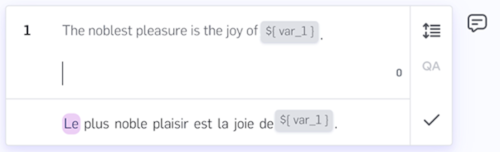
When LILT recognizes Non-Translatables (determined by special formatting set up on an account basis), the Non-Translatables will be displayed in gray boxes to indicate to translators and reviewers that these items are not to be translated.
 Non-Translatables can be used in a wide range of applications, such as:
* numbers
* formulas
* code
* email addresses
* currency
* proper names
LILT does not currently support a standardized Non-Translatable format. However, LILT can enable custom Non-Translatable pattern-matching rules for your account. Reach out to your account representative for more information about enabling custom Non-Translatable rules. Note that Non-Translatables will not be recognized in documents uploaded before this feature is enabled on your account; Non-Translatable matching only works for documents uploaded after your account is enabled with Non-Translatable pattern matching.
## **Using Non-Translatables in LILT Translate**
If a segment contains Non-Translatables, the Non-Translatable items are displayed inside gray boxes in the source text field. The suggestion field also displays any Non-Translatables in gray boxes.
Once a segment is confirmed, Non-Translatables are automatically projected into the target text field using Contextual AI. Non-Translatables may not always be projected into the correct positions; therefore, it is good practice to check the positioning of Non-Translatables after confirming a segment. Once Non-Translatables are added to the target text field, they can be moved around, but cannot be edited or deleted. Note that Non-Translatables can be moved even after the segment is confirmed.
Non-Translatables can be used in a wide range of applications, such as:
* numbers
* formulas
* code
* email addresses
* currency
* proper names
LILT does not currently support a standardized Non-Translatable format. However, LILT can enable custom Non-Translatable pattern-matching rules for your account. Reach out to your account representative for more information about enabling custom Non-Translatable rules. Note that Non-Translatables will not be recognized in documents uploaded before this feature is enabled on your account; Non-Translatable matching only works for documents uploaded after your account is enabled with Non-Translatable pattern matching.
## **Using Non-Translatables in LILT Translate**
If a segment contains Non-Translatables, the Non-Translatable items are displayed inside gray boxes in the source text field. The suggestion field also displays any Non-Translatables in gray boxes.
Once a segment is confirmed, Non-Translatables are automatically projected into the target text field using Contextual AI. Non-Translatables may not always be projected into the correct positions; therefore, it is good practice to check the positioning of Non-Translatables after confirming a segment. Once Non-Translatables are added to the target text field, they can be moved around, but cannot be edited or deleted. Note that Non-Translatables can be moved even after the segment is confirmed.
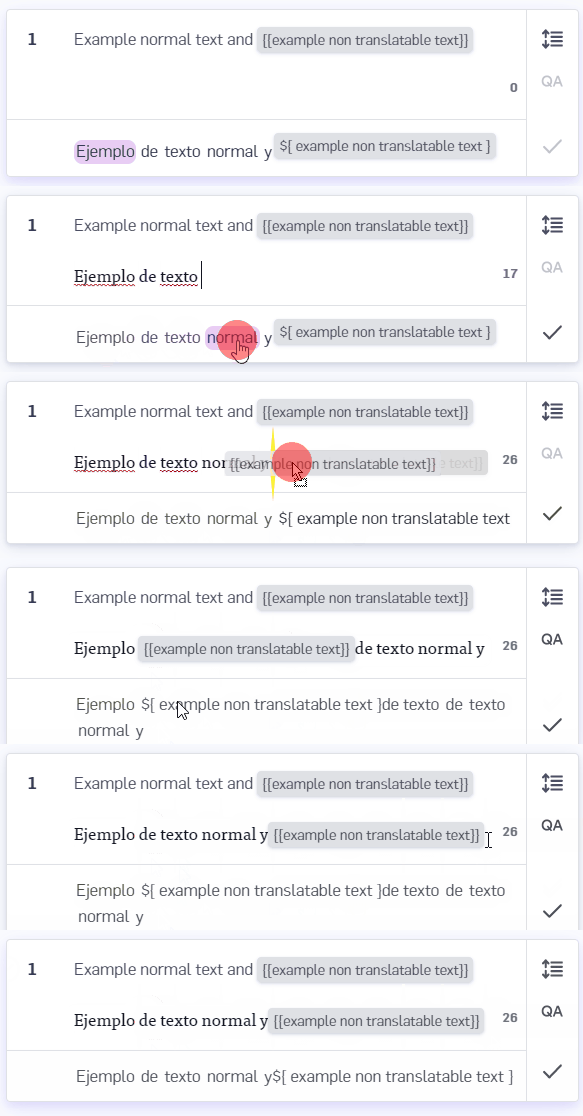
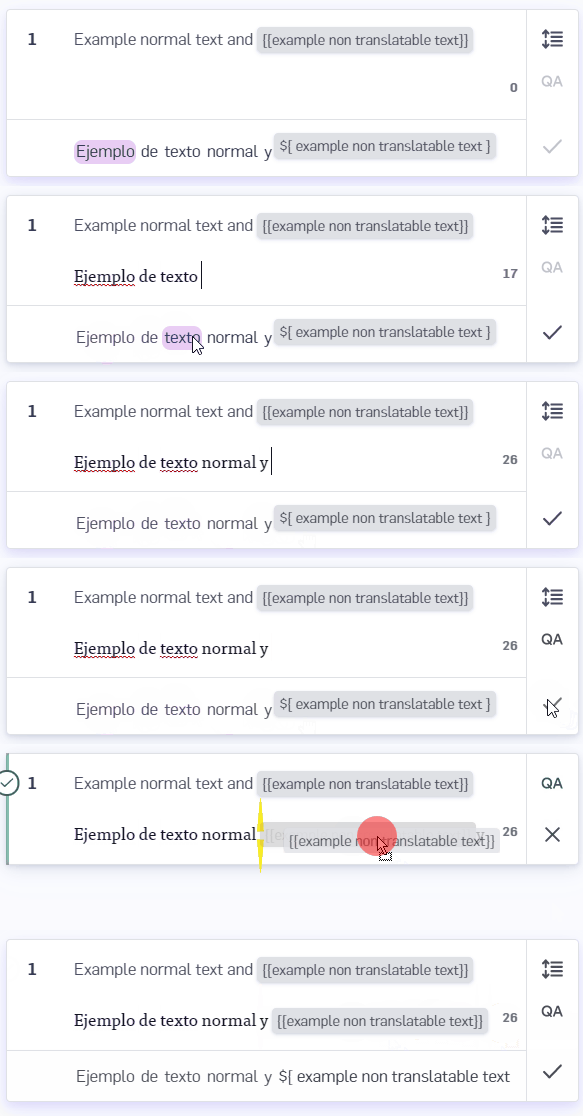 If you want to add Non-Translatables to the target text field before confirming a segment, you can manually project Non-Translatables at any time by clicking on the gray boxes in the suggestion field.
 When [Pretranslating](/kb/pretranslating-documents), for any segments with 100% TM matches available, any Non-Translatables will be carried over into the target text. In addition, when selecting the Pretranslation option to `UseContextual AI for unmatched segments`, Non-Translatables in the source text will be projected into the target text using Contextual AI. Projecting Non-Translatables using Pretranslation provides more accurate results than projecting Non-Translatables within LILT Translate.
There are two types of Non-Translatables discussed in the sections below: standalone Non-Translatables and paired Non-Translatables.
## **Standalone Non-Translatables**
Standalone Non-Translatables appear on their own and are not related to any other Non-Translatable item in the segment. Standalone Non-Translatable examples:
* HTML tags:
* * \
When [Pretranslating](/kb/pretranslating-documents), for any segments with 100% TM matches available, any Non-Translatables will be carried over into the target text. In addition, when selecting the Pretranslation option to `UseContextual AI for unmatched segments`, Non-Translatables in the source text will be projected into the target text using Contextual AI. Projecting Non-Translatables using Pretranslation provides more accurate results than projecting Non-Translatables within LILT Translate.
There are two types of Non-Translatables discussed in the sections below: standalone Non-Translatables and paired Non-Translatables.
## **Standalone Non-Translatables**
Standalone Non-Translatables appear on their own and are not related to any other Non-Translatable item in the segment. Standalone Non-Translatable examples:
* HTML tags:
* * \
* \![]() * Variables in software strings, such as:
* * `"String with one variable {0}"`
* `"String with one variable {0}"`
As an example, if your LILT account is configured to recognize text within two curly braces as Non-Translatables, then an English to French document containing `{{small}}` will not be translated to`{{pétit}}`, but will instead to preserve it as `{{small}}` when it is projected to the target text field.
## **Paired Non-Translatables**
A paired Non-Translatable item is an element of a tag pair. LILT currently supports paired Non-Translatables in this format:
* \ … \
Using paired Non-Translatables in this format causes LILT to treat them as tags within LILT Translate. This means they are not protected like with standalone Non-Translatables, and must be projected into the target text field using the `Project target tags` option under the `Tags` tab. For information on how to use tags, see the [Tags & Formatting](/kb/tags-formatting) article.
Paired Non-Translatables can be nested (and can encompass standalone Non-Translatables):
* `This sentence uses bold and italics together {{0}}.`
LILT does not currently support paired Non-Translatables in any other formats, such as:
* \{strong} … \{strong}
* \[bold] … \[/bold]
* Variables in software strings, such as:
* * `"String with one variable {0}"`
* `"String with one variable {0}"`
As an example, if your LILT account is configured to recognize text within two curly braces as Non-Translatables, then an English to French document containing `{{small}}` will not be translated to`{{pétit}}`, but will instead to preserve it as `{{small}}` when it is projected to the target text field.
## **Paired Non-Translatables**
A paired Non-Translatable item is an element of a tag pair. LILT currently supports paired Non-Translatables in this format:
* \ … \
Using paired Non-Translatables in this format causes LILT to treat them as tags within LILT Translate. This means they are not protected like with standalone Non-Translatables, and must be projected into the target text field using the `Project target tags` option under the `Tags` tab. For information on how to use tags, see the [Tags & Formatting](/kb/tags-formatting) article.
Paired Non-Translatables can be nested (and can encompass standalone Non-Translatables):
* `This sentence uses bold and italics together {{0}}.`
LILT does not currently support paired Non-Translatables in any other formats, such as:
* \{strong} … \{strong}
* \[bold] … \[/bold]