> ## Documentation Index
> Fetch the complete documentation index at: https://support.lilt.com/llms.txt
> Use this file to discover all available pages before exploring further.
# Source Highlighting Tool
[LILT Translate](/kb/introduction-to-lilt-translate) comes with a source highlighting tool that gives linguists quick access to terminology tools. To open the tool options popup, simply highlight the desired word or phrase in the source text. Once open, click any of the options to perform the corresponding action.
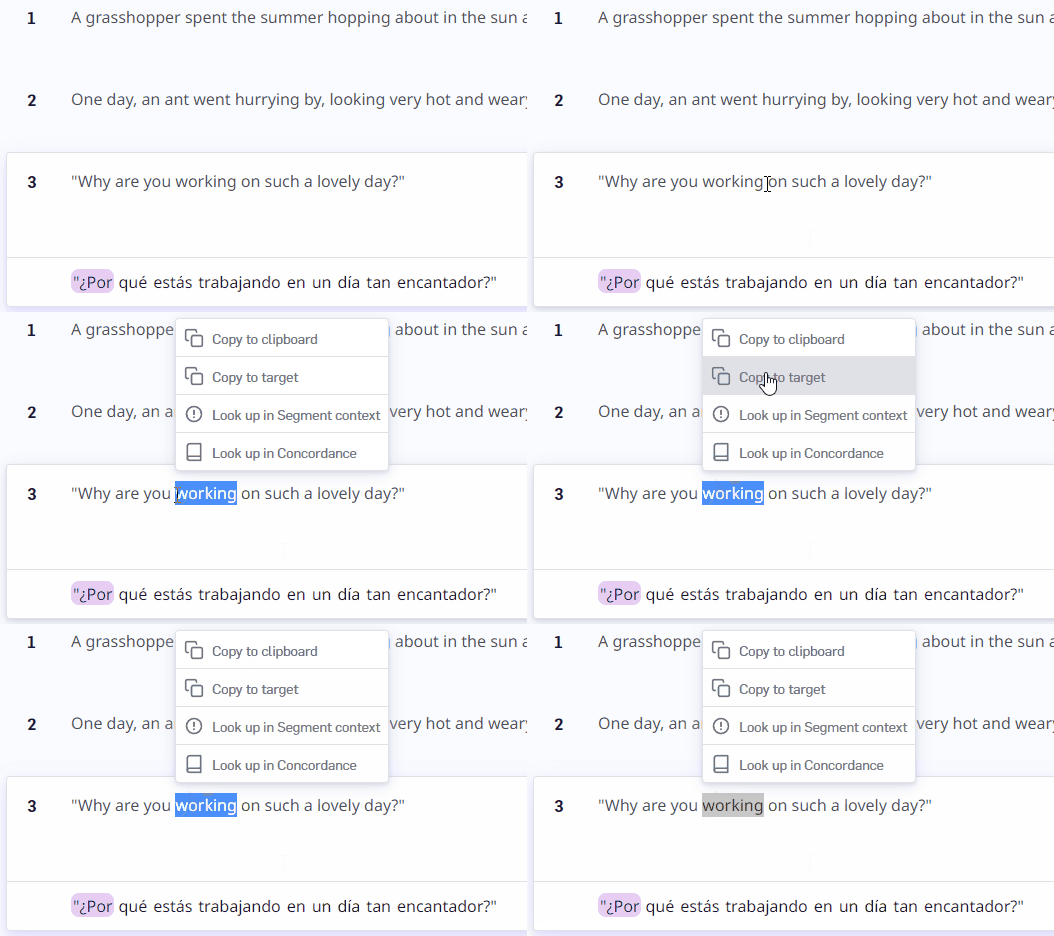 Source highlighting tool options:
* **Copy to clipboard:** Copies the highlighted source words to the clipboard.
* \*\*Copy to target: \*\*Copies the highlighted source words into the target text field.
* **Lookup in Segment Context:** Opens the [Segment Context](/kb/segment-context) sidebar, puts the selected source text into the search field, and searches for the text.
* **Lookup in Concordance:** Opens the [Concordance](/kb/concordance) sidebar, puts the selected source text into the search field, and searches for the text.
Source highlighting tool options:
* **Copy to clipboard:** Copies the highlighted source words to the clipboard.
* \*\*Copy to target: \*\*Copies the highlighted source words into the target text field.
* **Lookup in Segment Context:** Opens the [Segment Context](/kb/segment-context) sidebar, puts the selected source text into the search field, and searches for the text.
* **Lookup in Concordance:** Opens the [Concordance](/kb/concordance) sidebar, puts the selected source text into the search field, and searches for the text.