> ## Documentation Index
> Fetch the complete documentation index at: https://support.lilt.com/llms.txt
> Use this file to discover all available pages before exploring further.
# TM Leveraging
To speed up translation and reduce errors, LILT automatically leverages Translation Memory (TM) to populate the target text of empty, unreviewed segments with 100% or 101% matches. This feature is called TM Leveraging.
TM Leveraging is automatically applied to all documents that share a Translation Memory (even across Projects) each time they are opened in [LILT Translate](/kb/introduction-to-lilt-translate) (or when the LILT Translate page is refreshed).
* If a segment has any target text, TM Leveraging will not be applied (TM Leveraging will not overwrite any target text).
* Segments populated by TM Leveraging will display red match annotation of `100%` or `101%` to indicate what kind of match was found in the TM. This match annotation will go away when the document is reopened.
* If the [Project Settings](/kb/project-settings) option `Auto-confirm exact matches & repetitions` is enabled, segments populated by TM Leveraging will be automatically marked as confirmed. Otherwise, they will be left unconfirmed.
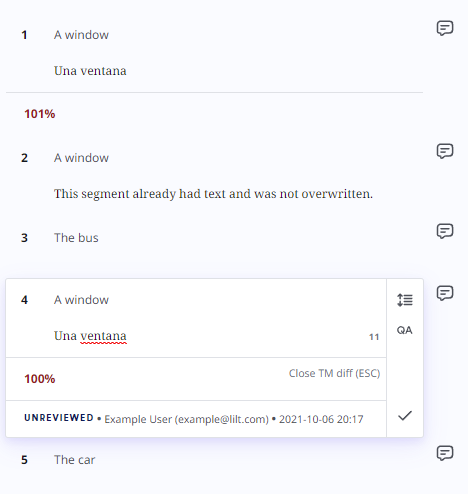
The following graphic displays what LILT Translate would look like after translating "A window" to "Una ventana" in one document and then opening another document that also contains matching segments.
 Segments in this example:
1. **"A window":** This was found to be a 101% match, so TM Leveraging was used.
2. **"A window"**: This segment already had text, and so TM Leveraging was not used.
3. **"The bus"**: No matching entry was found in the associated TM, so TM Leveraging was not used.
4. **"A window"**: This was found to be a 100% match, so TM Leveraging was used.
5. **"The car"**: No matching entry was found in the associated TM, so TM Leveraging was not used.
## TM Leveraging vs Overwrite Confirmed Segments
TM Leveraging differs from [Overwrite Confirmed Segments](/kb/auto-propagation) differs following ways:
| | **TM Leveraging** | **Overwrite Confirmed Segments** |
| ---------------------------------------------- | ----------------------------------- | --------------------------------------- |
| **Scope** | All documents sharing a Data Source | Current document open in LILT Translate |
| **Populates empty, unconfirmed segments** | Yes | Yes |
| **Populates filled, unconfirmed segments** | No | Yes |
| **Confirms the segment after populating** | No/Yes1 | Yes |
| **Overwrites target text** | No | Yes |
| **Overwrites confirmed segments** | No | No/Yes2 |
| **Displays match annotation after populating** | Yes | No |
1 If `Auto-confirm exact matches & repetitions` is enabled in the [Project Settings](/kb/project-settings), segments populated by TM Leveraging will be marked as confirmed; otherwise, they will be left unconfirmed.
2 If Forward Overwrite Confirmed Segments or Backward Overwrite Confirmed Segments are enabled, in addition to Overwrite Confirmed Segments being applied to unconfirmed segments, Overwrite Confirmed Segments will also be applied to confirmed matching segments.
Segments in this example:
1. **"A window":** This was found to be a 101% match, so TM Leveraging was used.
2. **"A window"**: This segment already had text, and so TM Leveraging was not used.
3. **"The bus"**: No matching entry was found in the associated TM, so TM Leveraging was not used.
4. **"A window"**: This was found to be a 100% match, so TM Leveraging was used.
5. **"The car"**: No matching entry was found in the associated TM, so TM Leveraging was not used.
## TM Leveraging vs Overwrite Confirmed Segments
TM Leveraging differs from [Overwrite Confirmed Segments](/kb/auto-propagation) differs following ways:
| | **TM Leveraging** | **Overwrite Confirmed Segments** |
| ---------------------------------------------- | ----------------------------------- | --------------------------------------- |
| **Scope** | All documents sharing a Data Source | Current document open in LILT Translate |
| **Populates empty, unconfirmed segments** | Yes | Yes |
| **Populates filled, unconfirmed segments** | No | Yes |
| **Confirms the segment after populating** | No/Yes1 | Yes |
| **Overwrites target text** | No | Yes |
| **Overwrites confirmed segments** | No | No/Yes2 |
| **Displays match annotation after populating** | Yes | No |
1 If `Auto-confirm exact matches & repetitions` is enabled in the [Project Settings](/kb/project-settings), segments populated by TM Leveraging will be marked as confirmed; otherwise, they will be left unconfirmed.
2 If Forward Overwrite Confirmed Segments or Backward Overwrite Confirmed Segments are enabled, in addition to Overwrite Confirmed Segments being applied to unconfirmed segments, Overwrite Confirmed Segments will also be applied to confirmed matching segments.