> ## Documentation Index
> Fetch the complete documentation index at: https://support.lilt.com/llms.txt
> Use this file to discover all available pages before exploring further.
# Translation Memory Matching and Suggestions
Each Data Source has memory entries containing source/target pairs, called TM entries. LILT improves translation speed and consistency by matching TM entries to segments that need translating and providing them as suggestions to linguists.
## Where TM matching is used in LILT
* **[TM segment suggestions](#tm-suggestions-in-lilt-translate):** When working in LILT Translate, translation suggestions are provided to linguists for the active segment. If there are any TM matches above 75%, the best match will be displayed as the suggestion. However, if there are no such TM matches, LILT uses the associated [Contextual AI](/kb/machine-translation) model to provide suggestions to the linguist. *Note that if the language pair does not have [Contextual AI](/kb/supported-languages), no Contextual AI suggestions will be shown.*
* **[Pretranslation](/kb/pretranslating-documents):** When Pretranslation is run, any segments that have 100% or 101% matches with TM entries in the associated Data Source are translated.
* **[TM Leveraging](/kb/tm-leveraging):** LILT automatically leverages TM entries in the associated Data Source to populate the target text of empty, unreviewed segments with 100% or 101% matches. This is performed across all documents that share the Data Source.
* **[Overwrite Confirmed Segments](/kb/auto-propagation):** When a linguist confirms or accepts a segment in LILT Translate, Overwrite Confirmed Segments updates matching segments (100% and 101%) with the same changes.
## TM match ordering
LILT leverages TM matches in the following order:
| **Prioritization order** | **Prioritization method** | **Prioritization** |
| ------------------------ | ------------------------- | --------------------------------------------------------------------------------------------------------------------------------------------------------------------------------------------------- |
| 1 | Match percent | TM entries with higher match percents are prioritized over TM entries with lower match percents. *For example, a TM entry that is a 100% match is prioritized over a TM entry that is a 95% match.* |
| 2 | Recency | More recently updated TM entries are prioritized over entries that weren't updated as recently based on the TM entry's modification time. |
*Note that the reviewed/unreviewed status of a TM entry does not affect match prioritization.*
### Prioritize recency setting
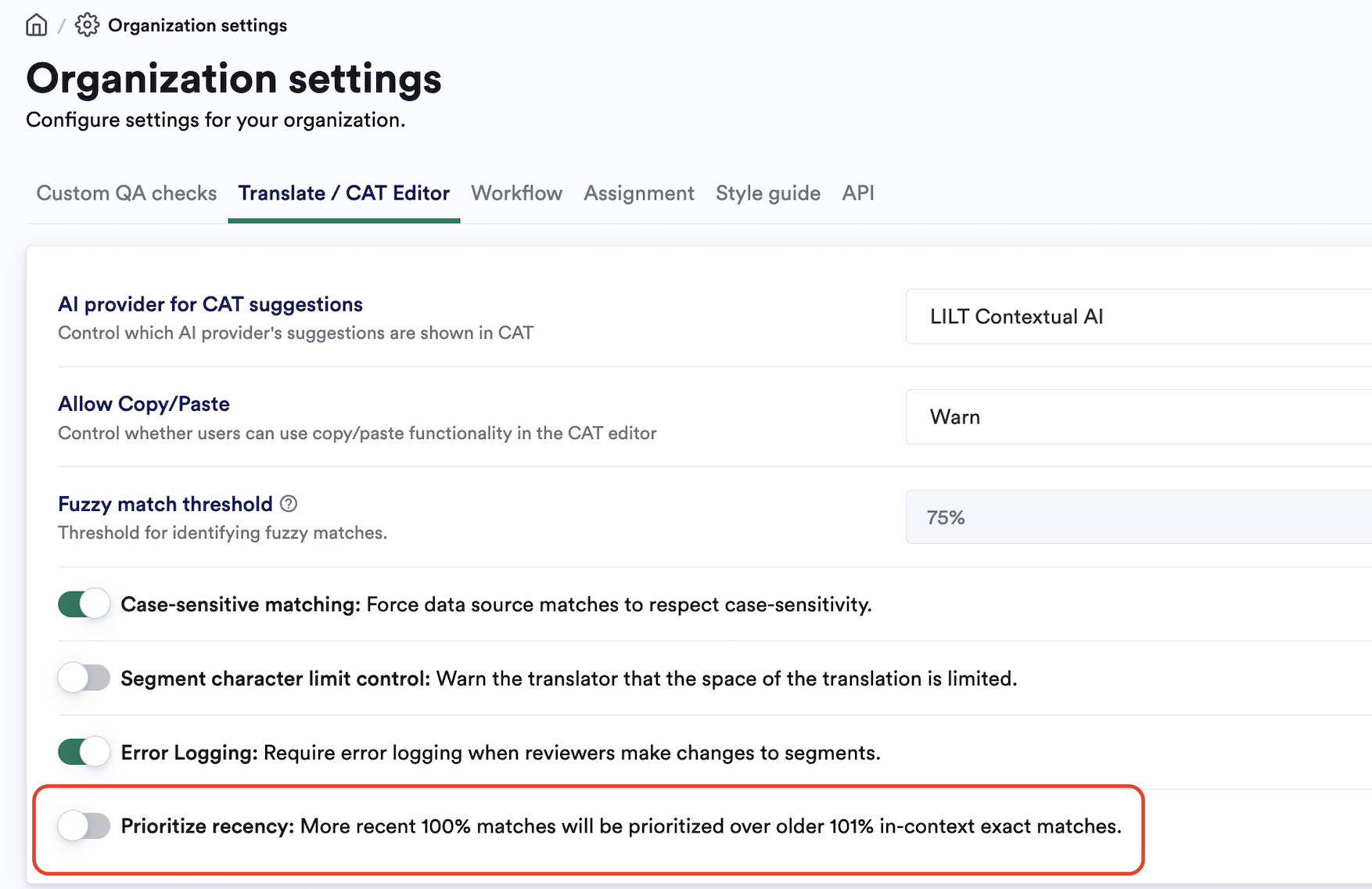
If enabled in Organization settings, this will disable 101% match priority and allow for recency-based match prioritization. 101% matches will be treated as equivalent to 100% matches, prioritizing recency over context precision.
 ## TM match scores
The table below outlines the various match scores in LILT.
| **Match percent** | **Match name** | **Match description** |
| ----------------- | ----------------------------------------------------------------------- | ------------------------------------------------------------------------------------------------------------------------------------------------------------------------------------------------- |
| 101% | ICE Match (In-Context Exact Match), sometimes called a Guaranteed Match | The selected segment has the exact same words as a TM entry. In addition, the segments before and after the selected segment are also identical to a set of three consecutive segments in the TM. |
| 100% | Exact Match | The selected segment has the exact same words as a TM entry. |
| 99% | 99% Fuzzy Match | The selected segment is almost exactly the same as a TM entry. A 99% match usually indicates there is a whitespace or tag mismatch. |
| >75% | Fuzzy Match | The segment has similar words to a TM entry, but there are significant differences. |
The lowest match percentage available is 75%. This is a set threshold and not configurable.
If the [Organization Setting](/kb/organization-settings) for `Case-sensitive matching` is enabled, TM match scoring takes into account any differences in letter casing; otherwise, casing is ignored.
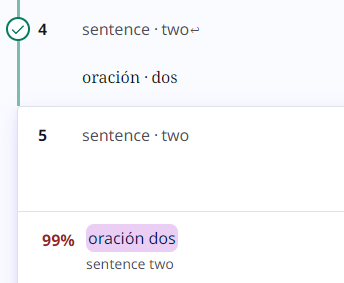
**In LILT, 100% matches that have whitespace differences or tag differences are downgraded to 99% matches.** In the example below, the bottom segment doesn't have a new line whitespace like the top segment does, so the TM match for the bottom segment is displayed as a 99% match.
## TM match scores
The table below outlines the various match scores in LILT.
| **Match percent** | **Match name** | **Match description** |
| ----------------- | ----------------------------------------------------------------------- | ------------------------------------------------------------------------------------------------------------------------------------------------------------------------------------------------- |
| 101% | ICE Match (In-Context Exact Match), sometimes called a Guaranteed Match | The selected segment has the exact same words as a TM entry. In addition, the segments before and after the selected segment are also identical to a set of three consecutive segments in the TM. |
| 100% | Exact Match | The selected segment has the exact same words as a TM entry. |
| 99% | 99% Fuzzy Match | The selected segment is almost exactly the same as a TM entry. A 99% match usually indicates there is a whitespace or tag mismatch. |
| >75% | Fuzzy Match | The segment has similar words to a TM entry, but there are significant differences. |
The lowest match percentage available is 75%. This is a set threshold and not configurable.
If the [Organization Setting](/kb/organization-settings) for `Case-sensitive matching` is enabled, TM match scoring takes into account any differences in letter casing; otherwise, casing is ignored.
**In LILT, 100% matches that have whitespace differences or tag differences are downgraded to 99% matches.** In the example below, the bottom segment doesn't have a new line whitespace like the top segment does, so the TM match for the bottom segment is displayed as a 99% match.
 ## How TM match percentages are calculated
LILT uses an [Edit Distance](https://en.wikipedia.org/wiki/Edit_distance) algorithm to calculate match percentages. However, because TMs can be large, it is not practical to compare every source segment to every entry in the TM. To simplify this problem, LILT first uses a [Locality-Sensitive Hashing](https://en.wikipedia.org/wiki/Locality-sensitive_hashing) algorithm to find a subset of the TM that is roughly similar to the source string, and then calculates the match percentage against each of those possibilities. This process is not 100% guaranteed to always produce every possible fuzzy match candidate, but rather allows for an optimized balance between quality of TM matches with speed/time to match.
In cases where our algorithm misses a fuzzy match, this is likely due to having multiple languages present in the same segment.
## TM suggestions in LILT Translate
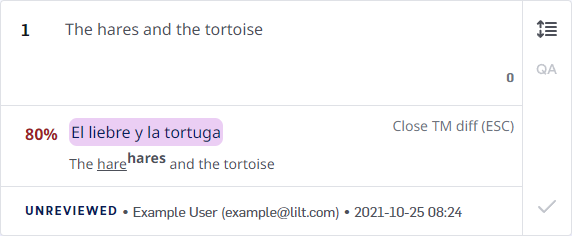
Translation Memories (TM) entries are used to provide translation suggestions to linguists working in [LILT Translate](/kb/introduction-to-lilt-translate). When a segment is active in LILT Translate, the associated Translation Memory is checked for TM entries with similar phrases. If any TM entries are found with similar phrases to the segment, the highest matching, most recent TM entry is displayed under the segment as a translation suggestion.
## How TM match percentages are calculated
LILT uses an [Edit Distance](https://en.wikipedia.org/wiki/Edit_distance) algorithm to calculate match percentages. However, because TMs can be large, it is not practical to compare every source segment to every entry in the TM. To simplify this problem, LILT first uses a [Locality-Sensitive Hashing](https://en.wikipedia.org/wiki/Locality-sensitive_hashing) algorithm to find a subset of the TM that is roughly similar to the source string, and then calculates the match percentage against each of those possibilities. This process is not 100% guaranteed to always produce every possible fuzzy match candidate, but rather allows for an optimized balance between quality of TM matches with speed/time to match.
In cases where our algorithm misses a fuzzy match, this is likely due to having multiple languages present in the same segment.
## TM suggestions in LILT Translate
Translation Memories (TM) entries are used to provide translation suggestions to linguists working in [LILT Translate](/kb/introduction-to-lilt-translate). When a segment is active in LILT Translate, the associated Translation Memory is checked for TM entries with similar phrases. If any TM entries are found with similar phrases to the segment, the highest matching, most recent TM entry is displayed under the segment as a translation suggestion.
 * 100% and 101% matches are automatically populated into the target text area (via [TM Leveraging](/kb/tm-leveraging)), rather than being provided as suggestions.
* If no matches exist above 75%, LILT provides a [Contextual AI suggestion](/kb/machine-translation) for the target text. If the language pair does not have [MT support](/kb/supported-languages), no MT suggestion will be shown.
## TM difference display
Fuzzy matches (less than 100%) are shown along with a display of the differences between the TM entry and the source.
Let's look at an example:
* **Segment source text:** `The hares and the tortoise`
* **TM entry:** `The hare and the tortoise` > `La liebre y la tortuga`
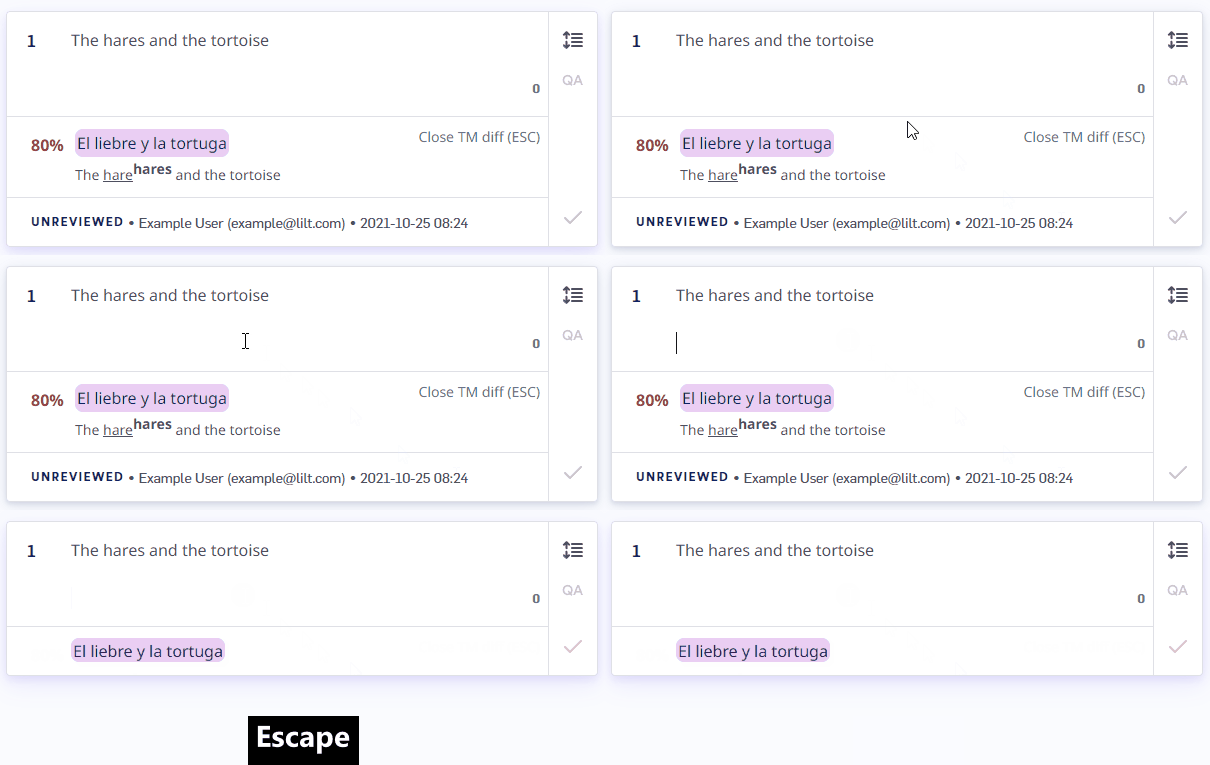
In this case, the TM diff displays the following: `The harehares and the tortoise`. The TM entry uses `hare`, while the source uses `hares`. Any words in the TM suggestion that are missing from the source are underlined. Substitutions from the source are displayed in superscript.
If you do not want to see the TM diff display for the active segment, press `Escape` to close it. Once closed, you can still access and use the TM suggestion, but the TM diff display (including match percent) will go away. The diff display can be brought back by refreshing the page.
* 100% and 101% matches are automatically populated into the target text area (via [TM Leveraging](/kb/tm-leveraging)), rather than being provided as suggestions.
* If no matches exist above 75%, LILT provides a [Contextual AI suggestion](/kb/machine-translation) for the target text. If the language pair does not have [MT support](/kb/supported-languages), no MT suggestion will be shown.
## TM difference display
Fuzzy matches (less than 100%) are shown along with a display of the differences between the TM entry and the source.
Let's look at an example:
* **Segment source text:** `The hares and the tortoise`
* **TM entry:** `The hare and the tortoise` > `La liebre y la tortuga`
In this case, the TM diff displays the following: `The harehares and the tortoise`. The TM entry uses `hare`, while the source uses `hares`. Any words in the TM suggestion that are missing from the source are underlined. Substitutions from the source are displayed in superscript.
If you do not want to see the TM diff display for the active segment, press `Escape` to close it. Once closed, you can still access and use the TM suggestion, but the TM diff display (including match percent) will go away. The diff display can be brought back by refreshing the page.
 ## View all TM matches for a segment
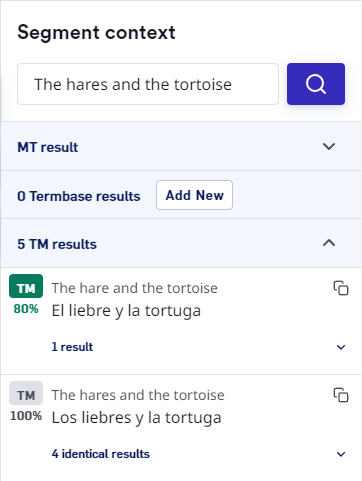
If there are multiple suggestions, they can be viewed in the [Segment Context](/kb/segment-context) pane on the right side of LILT Translate. The `Segment context` pane displays TM matches sorted in the following order:
1. Reviewed/unreviewed
2. Match percent
3. Most recently updated
**Note: The order of TM entries displayed in the `Segment context` pane is not the same as the TM match order. While the `Segment context` pane sorts by reviewed/unreviewed status, TM matching ignores reviewed/unreviewed status.**
## View all TM matches for a segment
If there are multiple suggestions, they can be viewed in the [Segment Context](/kb/segment-context) pane on the right side of LILT Translate. The `Segment context` pane displays TM matches sorted in the following order:
1. Reviewed/unreviewed
2. Match percent
3. Most recently updated
**Note: The order of TM entries displayed in the `Segment context` pane is not the same as the TM match order. While the `Segment context` pane sorts by reviewed/unreviewed status, TM matching ignores reviewed/unreviewed status.**
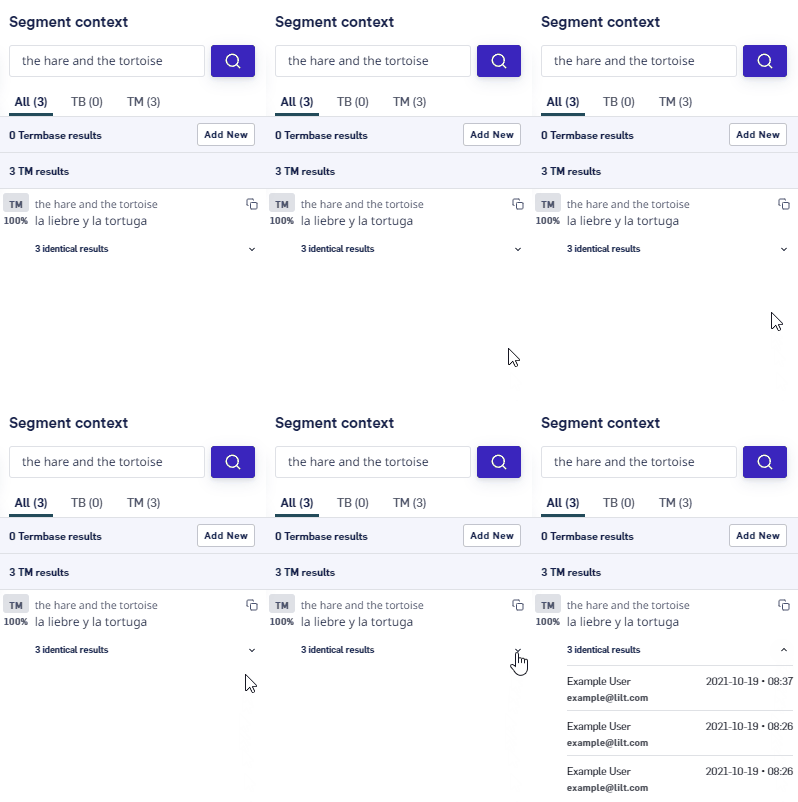
 If there are any identical TM entries in the associated Translation Memory, the `Segment context` pane will display so. Click the `identical results` dropdown to display the following metadata for each identical TM entry:
* attributed user
* timestamp of when the entry was last updated
If there are any identical TM entries in the associated Translation Memory, the `Segment context` pane will display so. Click the `identical results` dropdown to display the following metadata for each identical TM entry:
* attributed user
* timestamp of when the entry was last updated
 ## How TM entries are added to and removed from Data Sources
**TM entry metadata:** When a TM entry is added or modified, its metadata is updated:
* **Entry author:** Email address of the author. *Authorship is not always changed when an entry is updated. The sections below describe how and when authorship is updated.*
* **Entry timestamp:** Date and time the TM entry was last updated. *The time is displayed in the viewer's time zone.*
### Linguist actions that update TM entries
| **Action** | **Adds TM entry** | **Modifies TM entry** | **Removes TM entry** |
| -------------------------------------------------------- | ----------------- | --------------------- | -------------------- |
| A **translator** confirms a segment. | **✓** | | |
| A **translator** modifies and confirms a segment. | | **✓** | |
| A **translator** unconfirms a segment. | | | **✓** |
| A **reviewer** accepts a confirmed segment. | — | — | — |
| A **reviewer** modifies and accepts a confirmed segment. | | **✓** | |
| A **reviewer** accepts an unconfirmed segment. | **✓** | | |
The last person to confirm a segment is attributed as the TM entry author.
* *When a reviewer accepts a confirmed segment without modifying the target text, the author is left as the translator who confirmed the segment.*
* *When a reviewer accepts an unconfirmed segment, they are given authorship.*
* *Reviews have the ability to unconfirm segments, meaning that if a reviewer unconfirms a segment and then accepts the segment, they will be given authorship.*
### Project manager actions that update TM entries
| **Action** | **Adds TM entry** | **Modifies TM entry** | **Removes TM entry** |
| ---------------------------------------------------------------------------------------------------------------------------------------------------------------------------------------------------------------------- | ----------------- | --------------------- | -------------------- |
| A **project manager** [uploads a TM file](/kb/uploading-memory-files) to the Data Source. | **✓** | | |
| A **project manager** [removes a TM file](/kb/uploading-memory-files) from the Data Source on the `Manage resources` page. *Note: This will only remove the entries in the Data Source that were added from the file.* | | | **✓** |
| A **project manager** adds an individual TM entry in the Data Source from the `Manage entries` page. | **✓** | | |
| A **project manager** modifies an individual TM entry in the Data Source from the `Manage entries` page. | | **✓** | |
| A **project manager** removes an individual TM entry in the Data Source from the `Manage entries` page. | | | **✓** |
TM entries uploaded to the Data Source by a project manager are attributed to the TM entry authors listed in the TM file.
When a project manager manually adds a TM entry on the `Manage entries` page, they are made the author of the entry.
When a project manager manually modifies a TM entry on the `Manage entries` page, authorship is not changed.
### Automated processes that update TM entries
| **Action** | **Adds TM entry** | **Modifies TM entry** | **Removes TM entry** |
| ------------------------------------------------------------------------------------------------------- | ----------------- | --------------------- | -------------------- |
| [**TM Leveraging**](/kb/tm-leveraging) populates and confirms an unconfirmed segment. | **✓** | | |
| [**Overwrite Confirmed Segments**](/kb/auto-propagation) populates and confirms an unconfirmed segment. | **✓** | | |
| [**Overwrite Confirmed Segments**](/kb/auto-propagation) overwrites a confirmed segment. | | **✓** | |
| [**Pretranslation**](/kb/pretranslating-documents) populates and confirms an unconfirmed segment. | **✓** | | |
TM Leveraging and Overwrite Confirmed Segments attribute authorship to the user in the document when TM Leveraging or Overwrite Confirmed Segments is run.
Pretranslation attributes authorship to either the project manager or the author of the matching entries (depending on the Pretranslation settings).
## How TM entries are added to and removed from Data Sources
**TM entry metadata:** When a TM entry is added or modified, its metadata is updated:
* **Entry author:** Email address of the author. *Authorship is not always changed when an entry is updated. The sections below describe how and when authorship is updated.*
* **Entry timestamp:** Date and time the TM entry was last updated. *The time is displayed in the viewer's time zone.*
### Linguist actions that update TM entries
| **Action** | **Adds TM entry** | **Modifies TM entry** | **Removes TM entry** |
| -------------------------------------------------------- | ----------------- | --------------------- | -------------------- |
| A **translator** confirms a segment. | **✓** | | |
| A **translator** modifies and confirms a segment. | | **✓** | |
| A **translator** unconfirms a segment. | | | **✓** |
| A **reviewer** accepts a confirmed segment. | — | — | — |
| A **reviewer** modifies and accepts a confirmed segment. | | **✓** | |
| A **reviewer** accepts an unconfirmed segment. | **✓** | | |
The last person to confirm a segment is attributed as the TM entry author.
* *When a reviewer accepts a confirmed segment without modifying the target text, the author is left as the translator who confirmed the segment.*
* *When a reviewer accepts an unconfirmed segment, they are given authorship.*
* *Reviews have the ability to unconfirm segments, meaning that if a reviewer unconfirms a segment and then accepts the segment, they will be given authorship.*
### Project manager actions that update TM entries
| **Action** | **Adds TM entry** | **Modifies TM entry** | **Removes TM entry** |
| ---------------------------------------------------------------------------------------------------------------------------------------------------------------------------------------------------------------------- | ----------------- | --------------------- | -------------------- |
| A **project manager** [uploads a TM file](/kb/uploading-memory-files) to the Data Source. | **✓** | | |
| A **project manager** [removes a TM file](/kb/uploading-memory-files) from the Data Source on the `Manage resources` page. *Note: This will only remove the entries in the Data Source that were added from the file.* | | | **✓** |
| A **project manager** adds an individual TM entry in the Data Source from the `Manage entries` page. | **✓** | | |
| A **project manager** modifies an individual TM entry in the Data Source from the `Manage entries` page. | | **✓** | |
| A **project manager** removes an individual TM entry in the Data Source from the `Manage entries` page. | | | **✓** |
TM entries uploaded to the Data Source by a project manager are attributed to the TM entry authors listed in the TM file.
When a project manager manually adds a TM entry on the `Manage entries` page, they are made the author of the entry.
When a project manager manually modifies a TM entry on the `Manage entries` page, authorship is not changed.
### Automated processes that update TM entries
| **Action** | **Adds TM entry** | **Modifies TM entry** | **Removes TM entry** |
| ------------------------------------------------------------------------------------------------------- | ----------------- | --------------------- | -------------------- |
| [**TM Leveraging**](/kb/tm-leveraging) populates and confirms an unconfirmed segment. | **✓** | | |
| [**Overwrite Confirmed Segments**](/kb/auto-propagation) populates and confirms an unconfirmed segment. | **✓** | | |
| [**Overwrite Confirmed Segments**](/kb/auto-propagation) overwrites a confirmed segment. | | **✓** | |
| [**Pretranslation**](/kb/pretranslating-documents) populates and confirms an unconfirmed segment. | **✓** | | |
TM Leveraging and Overwrite Confirmed Segments attribute authorship to the user in the document when TM Leveraging or Overwrite Confirmed Segments is run.
Pretranslation attributes authorship to either the project manager or the author of the matching entries (depending on the Pretranslation settings).