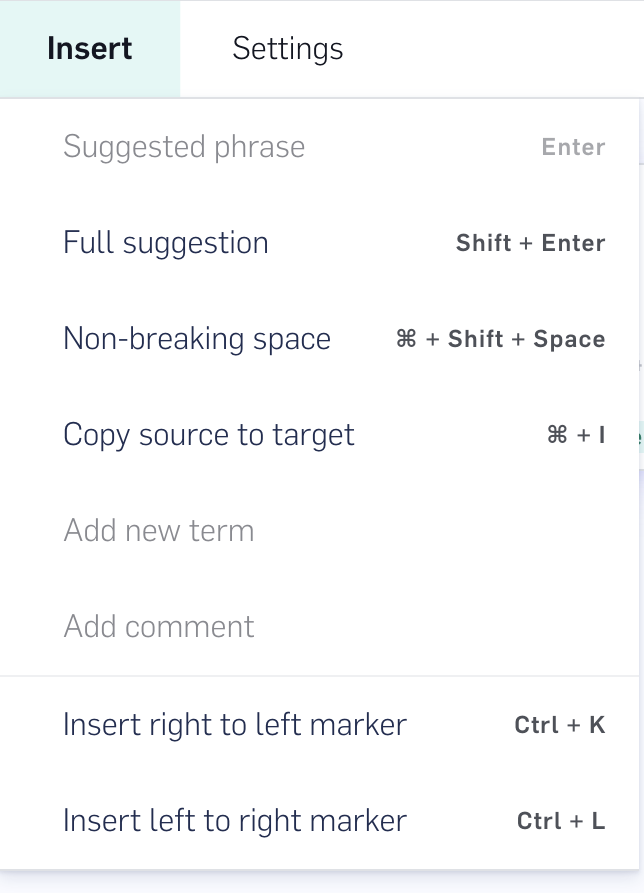
LILT Verify supports right-to-left (RTL) and left-to-right (LTR) directional marks. These controls are used to determine the way adjacent characters are grouped with the respect to text direction.As an example, let’s look at the phrase: “The language C++ is a programming language used…”When translating from English to Arabic without an LTR mark, the browser will render the phrase into this:لغة ++C هي لغة برمجة تستخدم…With an LTR entered inserted after “C++”, it will render as the writer intends:لغة C++ هي لغة برمجة تستخدم…This video demo in a previous version of LILT Verify further demonstrates how directional marks work.Directional marks can be added into the target text field from the Insert tab. Add a mark directly after the word you want to set directionality on.
You can also insert marks by using the following keyboard shortcuts:
Marker
Windows Shortcut
Mac Shortcut
Right-to-Left (RTL)
Ctrl + K
⌘ + K
Left-to-Right (LTR)
Ctrl + L
⌘ + L
Was this page helpful?
Assistant
Responses are generated using AI and may contain mistakes.